Your ZTE H3601P mesh device extends your WiFi coverage for a stronger signal throughout your home. You can add multiple mesh units to improve coverage in larger spaces.
How to Pair Your ZTE H3601P Mesh Device
How to Pair Your ZTE H3601P Mesh Device
Before You Start
- Ensure your main router is powered on
- Confirm your internet connection is working
- Place the mesh unit within WiFi range of the router
Light Indicator Guide
- Red - Not paired
- Flashing Blue - Paired, but the signal is weak
- Solid Blue - Paired with a good signal
If the light flashes blue, move the unit closer to the router.
Adding Multiple Mesh Units
You can pair more than one mesh unit to extend coverage further.
- Pair each unit one at a time
- Place each unit within range of the router or another mesh unit
- Avoid thick walls, cupboards, and electrical interference
Solid blue means correct placement. Flashing blue means move it closer. Red means it has lost connection.
More units improve coverage, but only if they maintain a strong link between each other.
Scenario A: Pairing to a ZTE H3601P Router Using WPS
This is the recommended method.
Step 1: Power On
Plug the mesh unit into a power outlet. The light will flash red.
Step 2: Press WPS on the Router
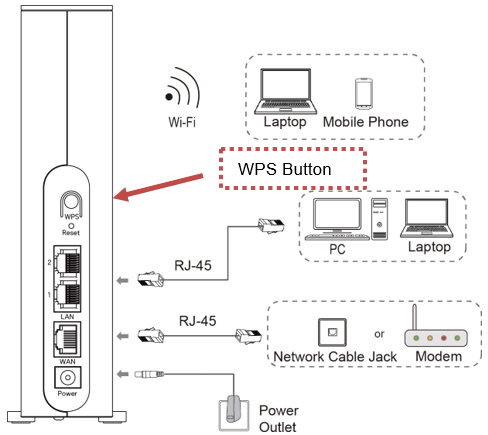
Press and hold the WPS button on the router for 2 to 3 seconds. The router light will flash.
Step 3: Press WPS on the Mesh Unit
Within two minutes, press and hold the WPS button on the mesh unit for 2 to 3 seconds. The mesh light will flash red.
Step 4: Wait for Pairing
Allow a few minutes for pairing to complete.
- Solid blue = Good signal
- Flashing blue = Weak signal
Move the unit closer if needed.
Scenario B: If WPS Fails (Wired Method)
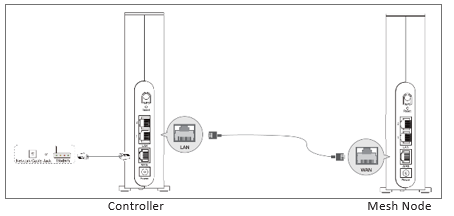
Step 1: Connect via Ethernet
Connect the mesh unit to a LAN port on the router using an Ethernet cable. Ensure both devices are powered on.
Step 2: Wait for Automatic Pairing
The mesh unit will configure itself. The light will turn blue once successful.
Step 3: Disconnect Ethernet
Unplug the cable once the light is blue.
Step 4: Move to Final Position
Place the unit where coverage is needed.
- Solid blue = Good connection
- Flashing blue = Weak signal
- Red = Connection lost
If red, move it closer or repeat the pairing process.
Scenario C: Pairing to a Non-ZTE Router
The mesh unit can also work with other routers.
Method 1: Using WPS
- Plug in the mesh unit. The light will turn red.
- Press the WPS button on your router for 2 to 3 seconds.
- Within two minutes, press WPS on the mesh unit.
- Wait for pairing.
Solid blue means a good signal. Flashing blue means move it closer.
Method 2: Set Up as an Access Point
If WPS is unavailable:
- Connect the mesh unit to a LAN port on your router using an Ethernet cable.
- Power on both devices.
- Wait for the light to turn blue.
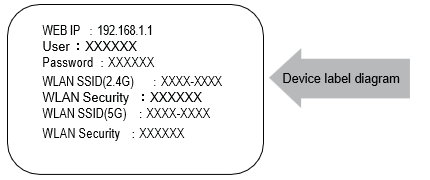
The mesh may broadcast its own WiFi network, often named something like ZTE_XXXX.
This setup may create a separate WiFi network rather than extending your existing one.
Move the unit to a central location. If the light turns red, it needs to be moved closer.
Quick Tips for Best Performance
- Place mesh units halfway between your router and weak signal areas
- Keep them out in the open, not inside cupboards
- Avoid placing them near microwaves or large metal objects
- Pair one unit at a time when adding multiple devices
- Always wait for the light to stabilise before moving the unit
Good placement makes more of a difference than adding extra devices.
Related Articles
©Mweb (Pty) Ltd. All rights reserved.