How To Find Missing Email
Why Sent Emails Can Go Missing After a Mail Configuration Change
Why Sent Emails Can Go Missing After a Mail Configuration Change
If your sent emails have disappeared after updating or changing your mail settings, this is usually related to where those emails were stored before the change.
Important:
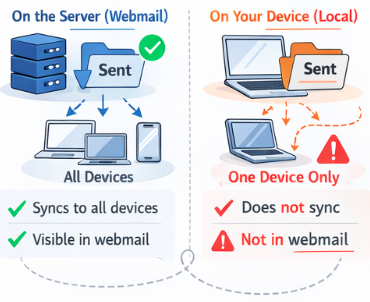
If the sent emails are not visible in webmail, they were most likely stored only on the original device.When a mailbox is reconfigured, locally stored mail does not automatically move to the server.
Sent Mail Was Stored Locally on the Device
Some mail apps store sent emails on the device instead of on the mail server.
After a configuration change, such as:
- Removing and re-adding an email account
- Changing server settings
- Switching from POP to IMAP
- Setting up the account on a new device
The Mail app may no longer display locally stored sent emails.
If the emails were saved under local folders such as On My Mac or On My Computer, they will not appear once the account is reconfigured.
Folder Mapping Reset After Reconfiguration
Mail apps use folder mapping to determine where sent items are stored.
After a configuration change, the mail app may:
- Create a new Sent folder
- Link to a different Sent folder
- Stop displaying the original Sent folder
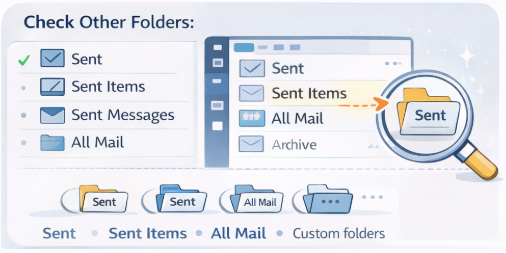
This can make it appear as if sent emails have disappeared, even though they may still exist in another folder.
Check for:
- Sent
- Sent Items
- Sent Messages
- All Mail
- Any custom folders
POP to IMAP Changes
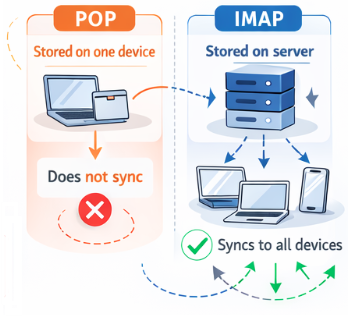
If the mailbox was previously set up using POP, sent emails may have existed only on one device.
When switching to IMAP:
- Only server-stored mail will sync
- Locally stored sent mail will not appear
- The mailbox will show only what exists on the server
This is one of the most common causes of missing sent emails after a configuration update.
Account Removed Before Mail Synced
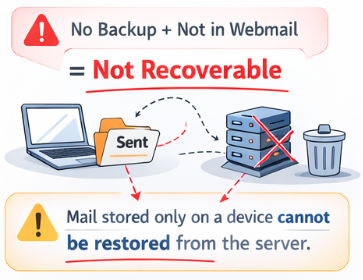
If the email account was removed during troubleshooting or migration, any locally stored mail may have been deleted with it.
Before removing an account, always ensure:
- All mail is visible in webmail
- Important mail is backed up
- Local folders have been checked
Once locally stored mail is deleted with no backup, it cannot be recovered from the mail server.
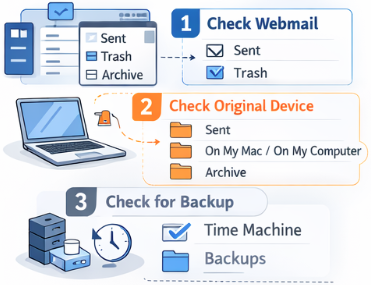
What to Check
If sent emails are missing after a configuration change:
- Log in to webmail and check Sent and Trash
- Check the original device used to send the emails
- Look under local folders such as On My Mac or On My Computer
- Confirm whether the account was previously POP or IMAP
How to Prevent This in Future
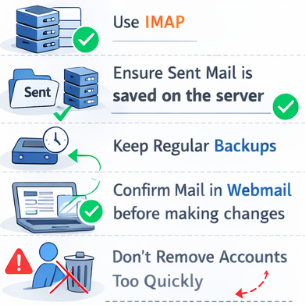
To avoid missing sent emails after changes:
- Use IMAP rather than POP
- Ensure sent mail is stored on the server
- Keep regular device backups
- Confirm all mail is visible in webmail before making changes
- Avoid removing accounts until the mail is confirmed safe
Related Articles
©Mweb (Pty) Ltd. All rights reserved.